AppMarketSpy
 › Utilities › ADClock Blackboard
★ 5.00average rating
1ratings
—new ratings, last 7 days
—not in top charts now
ADClock Blackboard is an iOS Utilities app by Hiroyuki Otsuka, released on Nov 11, 2012. The current version, 1.3.1, came out 3724 days ago. It has 1 ratings with an average of 5.0 stars. It is free to download.
🔒 Rating historydaily rating and rating countUnlock free — sign up
App info
- Developer
- Hiroyuki Otsuka
- Category
- Utilities
- Released
- Nov 11, 2012
- Version
- 1.3.1 (Sep 13, 2016)
- Price
- Free
- Size
- 27.5 MB
- Requires
- iOS 6.0
- Age rating
- 4+
- Languages
- EN, JA
In-app purchases
not checked yetCurrent prices, App Store US.
Keyword rankings
Where this app shows up in App Store search (US).
| kctcs blackboard | #19 | — |
| fnu blackboard | #27 | — |
About ADClock Blackboard
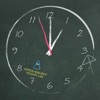
Analog and digital clock. This design theme is "Blackboard". You can set the various functions in the 2 settings button. General setting -> Setting button. Specific settings for each design -> (Q)uick Setup button. You can see the detail operating movie. Please press information (i) menu, and you will find app website. FEATURES ・12/24-hour display format switch. ・Date indication switch (English, Japanese, Korean). ・Auto lock ON/OFF. ・you can invert the design horizontal or vertical (reflect to mirrors and glass, etc.) ※ Shake -> invert switching. ・Time signal voice sound ON/OFF (English, Japanese). ※ You can switch 30 or 60 minutes intervals. NOTE: ・When this app does not start up, please try double-push the home button, and quit other running apps. ・There is no alarm function. ・Use iPhone or iPod Touch charging up for long term usage. ・Time accuracy is according to the internal clock.…
🔒 Developer intelligencelegal entity, account ID and every app from this sellerUnlock free — sign up